Search This Blog

Monday, June 24, 2013

OSD Locked

Always we are working with Monitor and LCD, Many time we want to adjust Some settings as like as Color,  Brightness, Contrast etc. We press Menu Button and view en error massage “OSD Locked”.
How Resolve issue:
Press Menu Button and hold down 10 – 20 Sec.

Saturday, June 15, 2013

Public Computer and Your Outlook Email

Today we are discussion on outlook.com email security. Many time we are work on public computer and your are trying to access your outlook.com email ID. At this time your are trying to enter password of your email account, it is not a secure method to access your email ID.
Now i am writing, What is secure method to access email on public computer ??
Add a Mobile number to your outlook Email Account
 Sign in to your Microsoft account using your email address and password.
  1. On your account page, under Password and security info,click link Edit security info.
  2. On the Security info page, select Add.
  3. Select your country code.
  4. Enter your mobile  number.
  5. Click Save.
use a single-use code Method on Outlook.com
Click on Sign in with Single-Use-Code 
Enter your Email ID
Select your Country Code
type your Mobile Number added to your account
Click on Text Me the Code
You’ll receive a text message with your single-use code
After you receive the code, enter it in the Single-use code box, and then click Sign in.

Read More >>

Wednesday, June 12, 2013

Hard Reset Micro-max A27

Today We are setting my office and en employ come in my office and Says.. Dear.. How I reset my Micro-Max A27 Android Mobile? My Keyboard is locked due too many pattern attempts ???
How I reset A27 Micro-max mobile ??

Download Two Tools form Following links and Install Drive in system.
  • Press and Hold Volume Down + Power Key.
  • Now you See Warning Logo (Fastboot Mode) on screen.
  • Plug in USB cable in your mobile and another side in your System
  • Install FastBoot Devices Driver.

Tuesday, June 11, 2013

Time limit of DC backup

This is a general guide line for a System Administrator :
Active Directory generally requires that the backup file be no more than 180 days old (By default Time is 60 Days Only, You can extent it for 180 Days). If attempt to you restore a backup that is expired, you may encounter .......       Read More>>

Monday, June 10, 2013

World's Fasted Super Computer

Chine has developed a new supercomputer "Tianhe-2" this is 74 % faster then Current faster Super Computer. Tianhe-2 is bailed with Intel and Xeon. Tianhe-2 is runs Kylin Linux OS.   

i cant access control panel in Windows 7

I am using Windows 7 in that i cant access control panel and some other application.It showing error message such as this is operation has been cancelled due to restriction in effect on this computer.please contact your system administrator…i have update my Anitvrus scanned it but no solution…plz guide me to come over this problem
By: Mujahid Basha
Solution:
Dear Brother,  Thanks for your mail.
This is happened due to GPO miss configuration or GPO configured by your System Administrator.
How to Access Control Panel In Windows Machine:
Open Run Menu by press two button on Kay-board Win+R
Type A Command in Run Menu GPEDIT.MSC“ 
Now navigate to the
User Configuration > Administrative Templates > Control Panel 
option from the left sidebar. You will be able to locate the
Prohibit access to the Control Panel 
option in the main window
Prohibit Access To Local Group Policy
Double click it and set its value to Disabled..
Kindly note: If your System is a domain client then contact to your System Administrator because May be that Control Panel is disabled by GPO on Domain Server.

Thursday, June 6, 2013

Event ID 55 Source Ntfs

Today I am shifting a old machine in new office and I am installing Software. I am notice that Machine is running slow or freeze while i am working.

I found an event in Event Viewer.

(How open Event Viewer: Open RUN menu and type "eventvwr")


In the System Event I found an Error event
Event ID: 55, Source: Ntfs, Category: DISK, Type: Error

Event 55 is showing error in Disk Drive C & D

Solution :

1. Open CMD and Type a command "ckhntfs /c c:"  
   c: is drive latter, which drive is faulty 
2. Press Enter
3. Restart System with Command "Shutdown -r -t 3"

System may take time to Shutdown.

I am sure that Problem will be resolved without format HDD.

Read More

Monday, June 3, 2013

Logon as FTP Protected User while Anonymous Activeted

Many time we are trying to access ftp with protected user (user authentication in ftp) but problem is that anonymous User is activated. At this time anonymous user auto login in ftp server.

Solution:1:: Use third party software as like as FileZilla Software or any other.

Solution:2:: Open Explorer and type ftp address in address bar. as like as ftp://ftp.xxyyzz.com/
                  Now Anonymous is browse in your explorer (Do not open Internet Explorer).
                  
If you are Open Internet Explorer then Open View Menu and Click On Open FTP Site in Windows Explorer.
                  
                  Right Click in Explorer and Select Login As... Option 


Click on Logon As


       Now In the Next Windows You can login as FTP User in your FTP Website.


            Read More


Saturday, June 1, 2013

Secure Email Digital Certificate Seciruty

Dear Friends,

Today we are talking for Secure Email Communication. Mostly we are using Outlook for E-Mail in home or Office. Email Certificate (S/MIME) protects your emails with encrypting and digitally signing.

Why We Required Secure Email Communication or Digital Certificate ?

Why We Need ?

1. Secure Authentication 

2. Privacy Management 

3. Integrity etc.

Some Websites are providing free of Cost. www.comodo.com is provide free of cost of Digital Email Signature.  How you can generate your free email signature for your personal email ID.

1. Browse Website http://www.comodo.com/home/email-security/free-email-certificate.php
2. Signup in www.comodo.com (Click on Free Email Certificate)
3. Fill Up Application for Secure Email Certificate.
4. Select 2048 bits High Grade Key size in Private Key Option.

Note: Type Strong Revocation Password.

5. After Fill up the form Click on Next Button.

You receive an email in your inbox and click on link (which in the email) for download your Personal Email Digital Certificate.

In the Next Post, I will post about How install Digital Certificate in your Outlook or other email client.

Read More


Thursday, May 30, 2013

Add New Entry is missing in SAP Logon PAD

Many time we are installing SAP (System Application & Products) Software in Our Office or Laptop System. After Finish installing we are trying to add Server Communication setting in SAP logon PAD but Add New Entry (Ctrl+n) is Missing in Right Click.

Solution:- 

                 Open following path in explorer. 
                                                               "C:\Program Files\SAP\SapSetup\setup\SAL\SapLogon.s8l" (only on 32 Bit OS)

Open The File : "SapLogon.s8l" and Create a shortcut on Desktop.


Kindly note: Do not Open "Saplgpad.s8l" file.


Read More

Email: deepak@deepuverma.in      http://www.deepuverma.in/blog

New Blog Domain Registered

Dear All,

I am glad to informing to you that I will be change Blog URL, and New Blog URL is http://deepuverma.in/blog

Kindly share your suggestions. Write an Email : deepak@deepuverma.in 

Tuesday, May 14, 2013

Play Game with Google Image Search

Friends,

Wow.... This is nice game i am play daily on google . You can play also

Open Google Image Search  (http://image.google.com)

Type Some Imagine word in Image Search : "atari breakout"
And Press Enter Key

::::: Play a good Game:::::


Saturday, April 13, 2013

My File Manager manage your Data and Data Folder


Welcome to My File Manager 


Now you can manage your Each year contain sub-folder of months where your file save on the basis of year and month of date of creating and you can browse your content folder with single click. It is a easy way to manage your daily office or home data with this folder.

This is sure that now managing of Your Daily Data and Data folder is easy with "My File Manager" Software. This is a freeware software for everyone.


You Can download from here :- 


Wednesday, February 6, 2013

Domain User add as Local Administrator User

Learn, How to add Domain User in Local Administrator Group on Client Machine.

Method 1 -  Configure a GPO on Domain Server (Learn In Next Post)

Method - Here we are learn about method two. 
               
             1. Client System convert Workgroup to Domain Networking
             2.  Login With Domain User, Which is you need to add in local administrator group.
             3.  Log off Domain User and Login back in Local administrator User Account.
             4.  Open "Control Panel" and Double Click on "User Accounts"
             5. Select User Account, Which is you need to and Click on "Properties"
             6.  Here Open A New Windows and Click on "Other"
             7.  Now Select "Administrator" in drop down menu and click on apply
              8. Log Off and Login Domain User.


Thursday, January 31, 2013

Virus attack on Universal Plug & Play (UPnP)

As per a New Report from Rapid7 

"A Security Flaw in Universal Plug & Play (UPnP) are exposing more than 50 millions of computers, printers and storage drives to attack by hackers remotely"

This type of virus is attack on USB port of our Printer / Router / Networking Devices/ Storage devices. Additional vulnerabilities, including ones that can be used in denial of service and remote code execution attacks, also exist in a UPnP library called MiniUPnP.

Rapid7 also release ScanNow UPnP, a free tool that can identify exposed UPnP endpoints in your network and flag which of those may remotely exploitable through recently discovered vulnerabilities. 

Download Tool From    

Wednesday, January 23, 2013

Repair Damaged ZIP file

How repair damaged zip file ? It is question for IT  Engineer . Many time your's zip file is damaged due to virus or any other reason and user may lost important data. We are mostly use ZIP for make backup or transfer files over internet. 

Today i found a free tool DiskInternals ZIP Repair for repair damaged ZIP file. Just download it, unpack and install onto your computer. However, if the user wishes to make the program better and more powerful, the responsive support team will be always glad to hear from you.

DiskInternals ZIP Repair  Download Link                      

Tuesday, January 22, 2013

"out of office" message is harmful

Today I am discussing with my friend for a telephone number of a private company. He is advised to me that kindly send bulk E-Mail on company's domain to many persons. Many employs are setup "OUT OF OFFICE" message while they are on leave and you get his lot of information about that employ.

Yes. He is right. You can gain important and many information about company and employ. It is suggestion to you that kindly ignore to set up "OUT OF Office" and "Auto Reply" message. If you are going on leave then you can set up "Out of Office auto-replies to internal User Only " and never send auto reply option with your personal information as like as position, Department, Other details.  

This is starting way to gain information by hackers. Kindly avoid all.


Saturday, January 19, 2013

Block Website with your Forward DNS Server

Many times, we are configure Forward DNS Server for Access Internet with your internal DNS Server.

 How To Block Website -

Suppose You want to block www.deepuverma.in website in your internal networking.

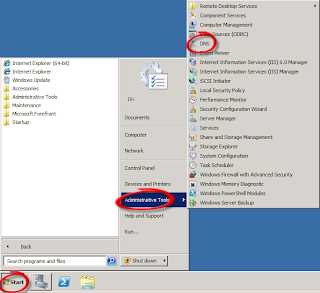
Open DNS Server Roll using Administrator Tool.

DNS Server
DNS Server Roll


Select "FORWARD LOOKUP ZONES"  Right Click and
Select "NEW ZONE"
The New Zone Wizard will open. Click the "Next" button, and choose "Primary Zone." 
Click the "Next" button again to continue. 
Enter the name of the website you wish to block in the "Name" field (deepuverma.in)
Click "Next." Accept the file name on the "Zone File" page,and click "Next," "Next," "Finish."

Right-click on your newly created zone file (deepuverma.in)
Choose "New Host (A)." Enter "www" in the "Name" box 
Enter "127.0.0.1" in the "IP address" box. 
Select "Create associated pointer (PTR) record," 
Click "Add Host." A success message is displayed
Click "OK" and "Done" to save your changes.

Thursday, January 17, 2013

lunching a website

Dear All,

This is information to you that We are lunching a website on same topic within few days. I hope where we will provide more details and coverage more topic on Server, Desktop, Network, Software and Web designing etc. Thanks to all .

Your suggestion are invited. You can tell us about what you want in my new website. please comment as your suggestion or email me.

I shall be coming soon with my new website.  

Wednesday, January 16, 2013

WebDAV with IIS

Dear,
            Recently I have install WebDAV with IIS. Every thing is right but it is not working on Client Machine. Kindly Suggestion ...

Ans - As per your question you have installed WebDAV Services with IIS. I hope your Client WebDAV on Client Services is not enabled. First Enable this service and check on client.

A Complete tutorial on WebDAV Protocol Read This Link -

http://www.windowsnetworking.com/articles-tutorials/windows-2003/WebDAV-IIS.html


DEEPAK KUMAR VERMA CALL 9214012330 MAIL - deepuverma@engineer.com