Search This Blog

Wednesday, February 6, 2013

Domain User add as Local Administrator User

Learn, How to add Domain User in Local Administrator Group on Client Machine.

Method 1 -  Configure a GPO on Domain Server (Learn In Next Post)

Method - Here we are learn about method two. 
               
             1. Client System convert Workgroup to Domain Networking
             2.  Login With Domain User, Which is you need to add in local administrator group.
             3.  Log off Domain User and Login back in Local administrator User Account.
             4.  Open "Control Panel" and Double Click on "User Accounts"
             5. Select User Account, Which is you need to and Click on "Properties"
             6.  Here Open A New Windows and Click on "Other"
             7.  Now Select "Administrator" in drop down menu and click on apply
              8. Log Off and Login Domain User.


Thursday, January 31, 2013

Virus attack on Universal Plug & Play (UPnP)

As per a New Report from Rapid7 

"A Security Flaw in Universal Plug & Play (UPnP) are exposing more than 50 millions of computers, printers and storage drives to attack by hackers remotely"

This type of virus is attack on USB port of our Printer / Router / Networking Devices/ Storage devices. Additional vulnerabilities, including ones that can be used in denial of service and remote code execution attacks, also exist in a UPnP library called MiniUPnP.

Rapid7 also release ScanNow UPnP, a free tool that can identify exposed UPnP endpoints in your network and flag which of those may remotely exploitable through recently discovered vulnerabilities. 

Download Tool From    

Wednesday, January 23, 2013

Repair Damaged ZIP file

How repair damaged zip file ? It is question for IT  Engineer . Many time your's zip file is damaged due to virus or any other reason and user may lost important data. We are mostly use ZIP for make backup or transfer files over internet. 

Today i found a free tool DiskInternals ZIP Repair for repair damaged ZIP file. Just download it, unpack and install onto your computer. However, if the user wishes to make the program better and more powerful, the responsive support team will be always glad to hear from you.

DiskInternals ZIP Repair  Download Link                      

Tuesday, January 22, 2013

"out of office" message is harmful

Today I am discussing with my friend for a telephone number of a private company. He is advised to me that kindly send bulk E-Mail on company's domain to many persons. Many employs are setup "OUT OF OFFICE" message while they are on leave and you get his lot of information about that employ.

Yes. He is right. You can gain important and many information about company and employ. It is suggestion to you that kindly ignore to set up "OUT OF Office" and "Auto Reply" message. If you are going on leave then you can set up "Out of Office auto-replies to internal User Only " and never send auto reply option with your personal information as like as position, Department, Other details.  

This is starting way to gain information by hackers. Kindly avoid all.


Saturday, January 19, 2013

Block Website with your Forward DNS Server

Many times, we are configure Forward DNS Server for Access Internet with your internal DNS Server.

 How To Block Website -

Suppose You want to block www.deepuverma.in website in your internal networking.

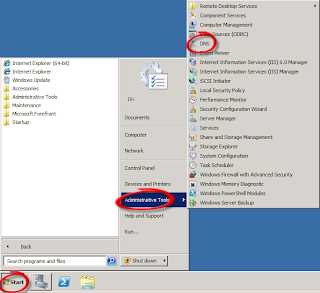
Open DNS Server Roll using Administrator Tool.

DNS Server
DNS Server Roll


Select "FORWARD LOOKUP ZONES"  Right Click and
Select "NEW ZONE"
The New Zone Wizard will open. Click the "Next" button, and choose "Primary Zone." 
Click the "Next" button again to continue. 
Enter the name of the website you wish to block in the "Name" field (deepuverma.in)
Click "Next." Accept the file name on the "Zone File" page,and click "Next," "Next," "Finish."

Right-click on your newly created zone file (deepuverma.in)
Choose "New Host (A)." Enter "www" in the "Name" box 
Enter "127.0.0.1" in the "IP address" box. 
Select "Create associated pointer (PTR) record," 
Click "Add Host." A success message is displayed
Click "OK" and "Done" to save your changes.

Thursday, January 17, 2013

lunching a website

Dear All,

This is information to you that We are lunching a website on same topic within few days. I hope where we will provide more details and coverage more topic on Server, Desktop, Network, Software and Web designing etc. Thanks to all .

Your suggestion are invited. You can tell us about what you want in my new website. please comment as your suggestion or email me.

I shall be coming soon with my new website.  

Wednesday, January 16, 2013

WebDAV with IIS

Dear,
            Recently I have install WebDAV with IIS. Every thing is right but it is not working on Client Machine. Kindly Suggestion ...

Ans - As per your question you have installed WebDAV Services with IIS. I hope your Client WebDAV on Client Services is not enabled. First Enable this service and check on client.

A Complete tutorial on WebDAV Protocol Read This Link -

http://www.windowsnetworking.com/articles-tutorials/windows-2003/WebDAV-IIS.html


DEEPAK KUMAR VERMA CALL 9214012330 MAIL - deepuverma@engineer.com

Friday, January 11, 2013

System Reports 'Access Denied' with Event ID 100 while FTP Access

I am working for configure a FTP server for a small size company. They are using Server 2003 for Domain and FTP Services. After Configuration of FTP Server we are getting an error to access site on client machine.

Event ID- 100,  Source - MSFTPSVC
Type - Warning

"The Server was unable to logon the Windows NT account "....\...." due to the following error: Logon failure error: unknown user name or bad password. The Data is the error code.

After testing every thing I am found that AD server is not authorized to logon in locally with Active Directory User and Group.


To resolve this issue, modify the Group Policy Object (GPO) for the domain controller to assign the Log on Locally user right to the Users group: 
  1. Open The  Domain Controller Security Policy.
  2. Double-click Security Settings, double-click Local Policies, and then click User Rights Assignment.
  3. Under Policy, click Log on Locally, and then click Add. 
  4. Click Browse, locate and click the appropriate group, and then click Add.
  5. Click OK in the open dialog boxes to close them and save the new settings.
Now Update your Group Policy on Server Using following Command or Log-off and Logon Your Server System.

- "Gpupdate.exe /force" 


DEEPAK KUMAR VERMA CALL 9214012330 MAIL - deepuverma@engineer.com

Wednesday, January 9, 2013

Your browser's cookie functionality is turned off. Please turn it on

Many time we are getting error massage Your browser's cookie functionality is turned off. Please turn it on while browse websites or E-Mail ID

Internet Explorer - 
Open Internet Explorer and Click on Tool Menu
                       (If Tool menu is not showing in IE, Press ALT key)
Open - Internet Options 
Open Privacy Tab 
         Click on Advanced Setting Menu
   Click on - Override Automatic Cookie Handling
  
Apply all setting and restart Internet Explorer. 

DEEPAK KUMAR VERMA CALL 9214012330 MAIL - deepuverma@engineer.com

Thursday, January 3, 2013

Display DNS Cache Info

How to Display DNS Cache Info -

Use Command  -  ipconfig /displaydns


DEEPAK KUMAR VERMA CALL 9214012330 MAIL - deepuverma@engineer.com

Tuesday, December 25, 2012

Wednesday, December 19, 2012

Certified Information Security Expert

Dear Friends,

I am happy to inform to you that I have passed my CISE exam. Now I become a Certified Information Security Expert. This certificate is awarded from Innobuzz Knowledge Solution to me on dated 19 December 2012 and This certificate is expired on 19 December 2015.

I am very happy.....................

Download My Resume From Here  Or Write en email for resume.


DEEPAK KUMAR VERMA CALL 9214012330 MAIL - deepuverma@engineer.com

Wednesday, December 5, 2012

Print Spooler Corrupt

How You Fix Corrupted Print Spooler Services ?

1. Run "SFC / Scannow" Command. Before Run Command, Kindly Insert Windows CD/ DVD in DVD Rom.
2. Expend File SPOOLSV.EX_ file from Windows's CD / DVD to System32 Folder with SPOOLSV.EXE Name.
3. Delete All Old Printer Driver From %systemroot%\system32\spool\printers\ Directory.

4.  sc config spooler depend= RPCSS
    (note the space after the = but not before)

5. Restart Spooler Services. 


DEEPAK KUMAR VERMA CALL 9214012330 MAIL - deepuverma@engineer.com

Tuesday, November 27, 2012

Difference between "request timed out" and "destination host unreachable"

Difference between "request timed out" and "destination host unreachable"?


Few day before We are troubleshooting a networking problem in my office. We are getting RTO after some time on my RF link and after 4 or 5 RTO, getting  Destination Host Unreachable for a long time. ISP saying that This problem creating due to Over Load on Link.

Before troubleshoot, I am learn about RTO and Destination Host Unreachable. Now I am writing here in short summary  -

so whats the difference between Destination host Unreachable and Request timed Out . When you ping a particular IP an ICMP payload is generated , a packet is generated which is sent through the network to the destination . There are many steps involved in this which I wont explain now .
When the packet does not reach the destination IP due to the unavailability of the IP in the routers routing table or the IP is down on the network or the server is down or other reasons you will get a ” Destination host Unreachable” message
In the other case the packet reaches the destination IP or Server and while on the return trip to the source it gets dropped due to some reasons you will get a “Request Timed Out” message


Now in the end I am tell you that We are found that ISP Backbone is faulty. 


DEEPAK KUMAR VERMA CALL 9214012330 MAIL - deepuverma@engineer.com

Saturday, November 24, 2012

Google IPV6 DNS Server

Today I am test my network on IPV6 with Google Public DNS Server and It is ruining fine and fast  -

Google Public DNS IP addresses


The Google Public DNS IP addresses (
IPv4) are as follows:
  • 8.8.8.8
  • 8.8.4.4
The Google Public DNS IPv6 addresses are as follows:
  • 2001:4860:4860::8888
  • 2001:4860:4860::8844


For More Information Visit Google DNS Server Help Page. 


DEEPAK KUMAR VERMA CALL 9214012330 MAIL - deepuverma@engineer.com

Saturday, November 3, 2012

System Hangs On Welcome Screen

Your Windows System is hangs on Welcome Screen while you are login in your system with your User Name and Password.

Solution:-
1. Please Check that Network Connection and Network is working Fine (If you are in Domain)
2. Check Your IP address and DNS Setting on Client System.(If you are in Domain)
3. Reset Your Active Directory User Account, (If you are in Domain)
4. Check NTUSER.DAT file for Corrupt.
3. Check NTUSER.DAT.LOG for Corrupt.
4. Check NTUSER.IN for Corrupt.
5. If any file corrupt then replace file with another user file.
6. Check BAD Sector in Your HDD.
7. Check Error for HDD.


DEEPAK KUMAR VERMA CALL 9214012330 MAIL - deepuverma@engineer.com

Sunday, October 21, 2012

Network ID disable In Windows XP / Vista / 7 - 2


My first post on Network ID

http://deepuinfo.blogspot.in/2010/05/network-id-disable-in-windows-xp-vista.html

Now I am writing some solutions for it -

1. Update NIC Card Driver
2. Update Windows Services Pack.

 Please read Part One http://deepuinfo.blogspot.in/2010/05/network-id-disable-in-windows-xp-vista.html


DEEPAK KUMAR VERMA CALL 9214012330 MAIL - deepuverma@engineer.com

Tuesday, October 9, 2012

Encrypted your Email Without Any Software

If you want to be sure that your email can be read by no one but you, then it needs to be encrypted. You'd be surprised to find out who might want to read your email.

The Best solution is "HUSMAIL.Com". Open free e-mail account and send mail with HUSMAIL.COM

As seen in image, be sure that Encrypted option is enabled and type your Hind Question and Answer for secure your email. please note that If your Answer is not remember then you are failed to open email.


Husmail View


DEEPAK KUMAR VERMA CALL 9214012330 MAIL - deepuverma@engineer.com

Friday, October 5, 2012

Directory have space in name - MS DOS

Dear Friends,

Many time you are use MS DOS and while Use type CD (Change Directory) Command you failed to Change Directory which is have space in Name.

Exp. - "Program File"

How You Do it ?

C:\ CD "program files" (Hit Enter)

Means Use the " " while Directory have space in name.


DEEPAK KUMAR VERMA CALL 9214012330 MAIL - deepuverma@engineer.com

Friday, September 28, 2012

latency Problem with Windows 7 or Server 2008

                    Many time, we found high latency problem on our network with windows 7 or Server 2008.  Now Microsoft has realised a hot fix for fix that issue and decreased 5 to 25 % latency.

As per Microsoft -

"Transmission Control Protocol (TCP) loopback latency and User Datagram Protocol (UDP) latency in Windows Server 2008, Windows Server 2008 R2, Windows Vista, and Windows 7 are longer than TCP loopback latency and UDP latency in Windows Server 2003.

This issue affects applications or services that use TCP loopback or UDP for communication."

Please download hot-fix tool

Download

KB   http://support.microsoft.com/kb/979612


DEEPAK KUMAR VERMA CALL 9214012330 MAIL - deepuverma@engineer.com